
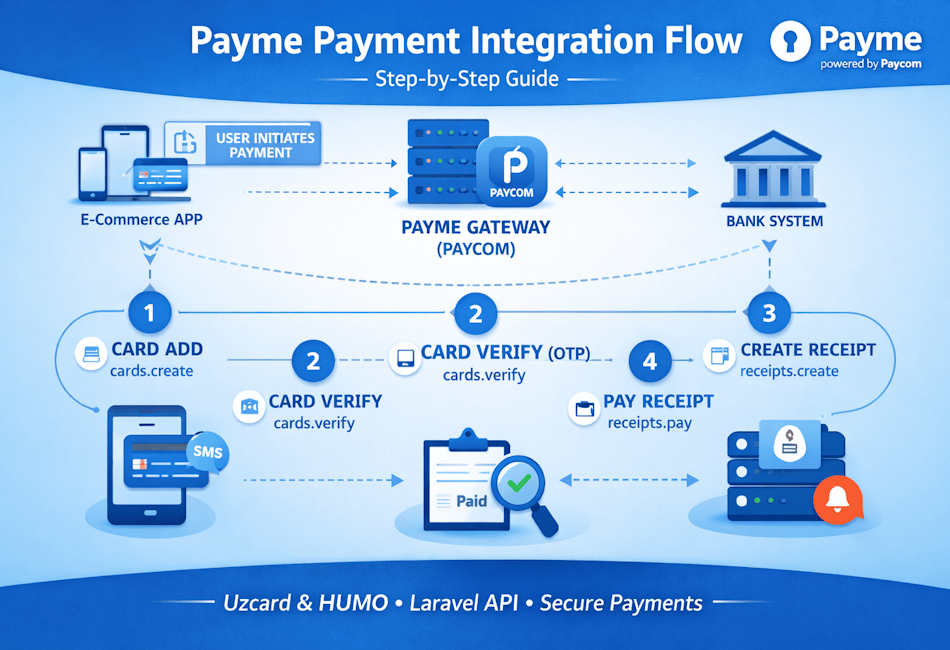
Payme (Paycom) Payment Gateway Integration – Step-by-Step Guide (Laravel)
Online payments are essential for modern applications in Uzbekistan. Payme (powered by Paycom) is one of the most trusted payment gateways for card payments, subscriptions, and recurring billing.
In this blog, we’ll explain Payme integration step by step, using Laravel and real API methods.
What You’ll Learn
-
How Payme works internally
-
Card add & verification flow
-
Receipt creation & payment
-
Status checking
-
Common errors & best practices
Prerequisites
Before starting, make sure you have:
-
Payme Merchant ID
-
Payme Merchant Key
-
Laravel 8+ project
-
HTTPS enabled (mandatory for production)
Payme Integration Flow (Overview)
Here is the standard Payme payment lifecycle:
-
Create & save card
-
Verify card (OTP)
-
Create receipt (invoice)
-
Pay receipt
-
Check payment status
-
Handle webhook (recommended)
Step 1: Add Card (cards.create)
This step registers the user’s card in Payme.
{
“id”: 1,
“method”: “cards.create”,
“params”: {
“card”: {
“number”: “8600069195406311”,
“expire”: “0399”
},
“save”: true
}
}
Returns a card token
Card is NOT usable yet
Step 2: Verify Card (cards.verify)
Payme sends an OTP to the cardholder.
{
“id”: 2,
“method”: “cards.verify”,
“params”: {
“token”: “CARD_TOKEN”,
“code”: “666666”
}
}
After success, the card becomes active
Step 3: Create Receipt (receipts.create)
A receipt is an invoice. No money is charged here.
{
“id”: 3,
“method”: “receipts.create”,
“params”: {
“amount”: 1500000,
“account”: {
“order_id”: “ORD-1001”
}
}
}
Amount is in tiyin (1,500,000 = 15,000 UZS)
Step 4: Pay Receipt (receipts.pay)
This step charges the saved card.
{
“id”: 4,
“method”: “receipts.pay”,
“params”: {
“id”: “RECEIPT_ID”,
“token”: “CARD_TOKEN”
}
}
Payment is initiated
Receipt state changes to 4 on success
Step 5: Check Payment Status (receipts.check)
Used to verify payment result.
{
“id”: 5,
“method”: “receipts.check”,
“params”: {
“id”: “RECEIPT_ID”
}
}
| State | Meaning |
|---|---|
0 |
Created |
1 |
Paying |
4 |
Paid |
50 |
Cancelled |
Step 6: Handle Webhooks (Recommended)
Payme sends server-to-server notifications when payment status changes.
Always trust webhook + state = 4
Avoid aggressive polling with receipts.check
Test Cards for Sandbox
Use these ONLY in test environment:
| Card Type | Number | Expiry | OTP |
|---|---|---|---|
| Uzcard | 8600 0691 9540 6311 | 03/99 | 666666 |
| Humo | 9860 0101 0101 0101 | 03/99 | 666666 |
Common Payme Errors & Fixes
| Error Code | Meaning | Solution |
|---|---|---|
-31400 |
Card not found | Re-add card |
-31001 |
Unauthorized | Check X-Auth |
-31050 |
Amount mismatch | Recalculate total |
-31007 |
Too many OTP attempts | Wait & retry |
Final Thoughts
ayme integration is secure, scalable, and reliable when implemented correctly.
Following the official flow ensures smooth payments and fewer failures.
If you are building:
-
E-commerce
-
Subscription platforms
-
SaaS billing
-
Mobile apps
Payme is a solid choice for Uzbekistan payments.
Need Help? to integrate with your application please contact us.